










































Fugu casino login works with an email address, a phone number or a Google or Telegram account — the last two take a single click, because the profile is created automatically. Below: the step-by-step sign-in from a browser and from a phone, password resets, how the mirror works and how to protect the profile.
The guide is written for newcomers: the Fugu platform keeps the casino and sports betting inside one profile, so a single login covers every section. The account currency for players in Ukraine is UAH.
The text is informational and is not a call to gamble. Gambling is available only to people aged 21 and over.
| Parameter | Value |
|---|---|
| Sign-in methods | Email, phone number, Google, Telegram |
| Quick registration | Via Google or Telegram — one click |
| Currency | UAH (country — Ukraine) |
| Age | 21+ |
How to sign in to a Fugu Casino account
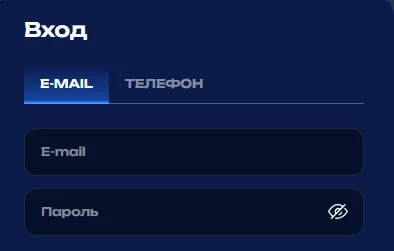
Fugu Casino accepts two kinds of identifier: the email address or the phone number given at registration. Signing in through Google or Telegram skips the form entirely.
Credentials for signing in
The login is the email address or phone number from the sign-up form. The password is the one set in that form together with the country and the account currency.
Step-by-step sign-in from a browser
- Open the official site or a working mirror.
- Press the sign-in button in the top corner.
- Enter the email or phone and the password — or pick Google/Telegram.
- Confirm and go through to the account area.
Keeping the session active
The “remember me” option keeps the session alive on a personal device. On someone else’s computer it is better left off, with a manual sign-out at the end.
Mobile sign-in to Fugu
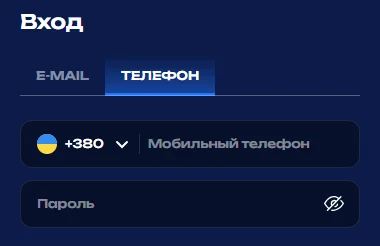
Fugu casino login from a phone is no different from the desktop one: the same form, the same credentials. The mobile version needs no separate registration.
Signing in through a mobile browser
The site is adapted for Android and iOS. Opening the domain in Chrome or Safari and signing in the usual way is enough.
Home-screen shortcut and the app
The browser menu adds the site to the home screen as a shortcut — quick access without typing the address every time.
Autofill and cookies
The device password manager fills the login in automatically. When the form misbehaves, clearing cookies usually helps.
| Setting | Effect |
|---|---|
| Autofill | Fast sign-in without typing |
| Clearing cookies | Fixes sign-in form glitches |
| Home-screen shortcut | Access in one tap |
Recovering access to Fugu UA
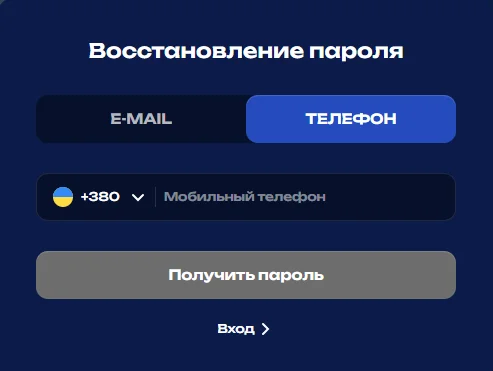
The Fugu sportsbook restores a password by email or SMS. The procedure takes a few minutes.
Resetting the password
- Press “Forgot your password?” in the sign-in form.
- Give the email address or phone number on the account.
- Receive the reset code or link.
- Set a new strong password and sign in.
Lockouts and technical faults
Several failed attempts can lock sign-in temporarily. Anything to do with account checks is handled by support.
| Problem | Solution |
|---|---|
| Forgotten password | Reset by email/SMS |
| Temporary lockout | Wait 15–30 minutes or contact support |
| The site does not open | A mirror or a different browser |
The Fugu mirror and the alternative domain
Fugu casino sign-in through a mirror uses the same player database: only the address changes, not the platform server.
Checking redirects and the connection
Before entering any credentials it is worth checking the HTTPS connection and the exact domain. Mirror addresses are better taken from official channels than from search results.
One profile, one balance
- One login for the main domain and for mirrors.
- Balance, bets and bonuses stay in sync.
- A second registration is unnecessary and against the rules.
The Fugu Casino account area after signing in
Once signed in, the Fugu online casino opens the full feature set: payments, games, bets, bonuses. The welcome package is activated during registration or later with an activation code.
Balance and payment history
- Deposits and withdrawals in hryvnia.
- Transaction history and request statuses.
Access to the casino and to betting
- Slots, live games and the sports line in one profile.
- A bonus section with the wagering terms.
Verification after signing in
The platform may ask for documents before a withdrawal. The account check is the standard KYC procedure, and it protects the player’s money.
Account security and sign-in protection at Fugu
Fugu never asks for a password in emails or messengers. A safe sign-in is the responsibility of both sides.
Signs of a fake page
- A domain with typos or extra characters.
- No HTTPS.
- A request for a code or password “for verification”.
A unique password and browser protection
- A separate password that is not reused on other sites.
- An up-to-date browser and a password manager.
Active sessions and signing out remotely
- Open the account area, security section.
- Review the list of active sessions.
- End the suspicious ones and change the password.
Automatic session timeout
After a long idle period the session closes on its own — standard protection against someone else reaching an open tab.
Fugu UA support — the contact channels
Questions about signing in, verification and payments are handled by Fugu support.
| Channel | Used for |
|---|---|
| Live chat | Urgent sign-in problems |
| Verification, documents | |
| Telegram | Quick answers and mirrors |
FAQ
Short answers to the questions newcomers ask most.
How do I get into a Fugu account without the password?
How do I get into an account without the password?
Through Google or Telegram, if the profile was created that way. Otherwise — a password reset via “Forgot your password?”.
Why does Fugu say “wrong login or password”?
Why does the system say “wrong login or password”?
A typing mistake, a different keyboard layout, or stale autofill data. Typing the credentials by hand and resetting the password both help.
How long is the sign-in confirmation code valid?
How long is the confirmation code valid?
Usually a few minutes. Once it expires a new one is requested and the old one stops working.
Can I sign in to Fugu from two devices at once?
Is signing in from two devices at once possible?
Yes, the profile works on a computer and a phone in parallel. Suspicious sessions are worth ending in the security settings.
Fugu, Фугу, Fugu Casino and Fugu sportsbook — is it one platform?
Is it one platform?
Yes, these are different spellings of one gambling platform with a single account for the casino and for betting.
The material is informational and does not urge anyone to gamble. Play responsibly: set limits and stop in good time. 21+.